{ "@context": "https://schema.org", "@graph": [ { "@type": "WebPage", "@id": "https://www.floik.com/features/insights---basic-advanced#webpage", "url": "https://www.floik.com/features/insights---basic-advanced", "name": "Insights - Basic \u0026 advanced", "description": "Review views, clicks, comments, and engagement for published Flos. Use Advanced Insights to inspect step clicks, drop-off points, and completion rates.", "inLanguage": "en", "isPartOf": { "@id": "https://www.floik.com/#website" }, "about": { "@id": "https://www.floik.com/#software" }, "primaryImageOfPage": { "@id": "https://www.floik.com/features/insights---basic-advanced#primaryimage" } }, { "@type": "ImageObject", "@id": "https://www.floik.com/features/insights---basic-advanced#primaryimage", "contentUrl": "https://cdn.prod.website-files.com/646decbb1ee966061c86eaf1/6ae2c9e3d6d2f92b61af3a75_6ae2c95faa68f14ab3029364_floik-feature-insights---basic-advanced-hero.avif" } ] }
Engage

Insights - Basic & advanced

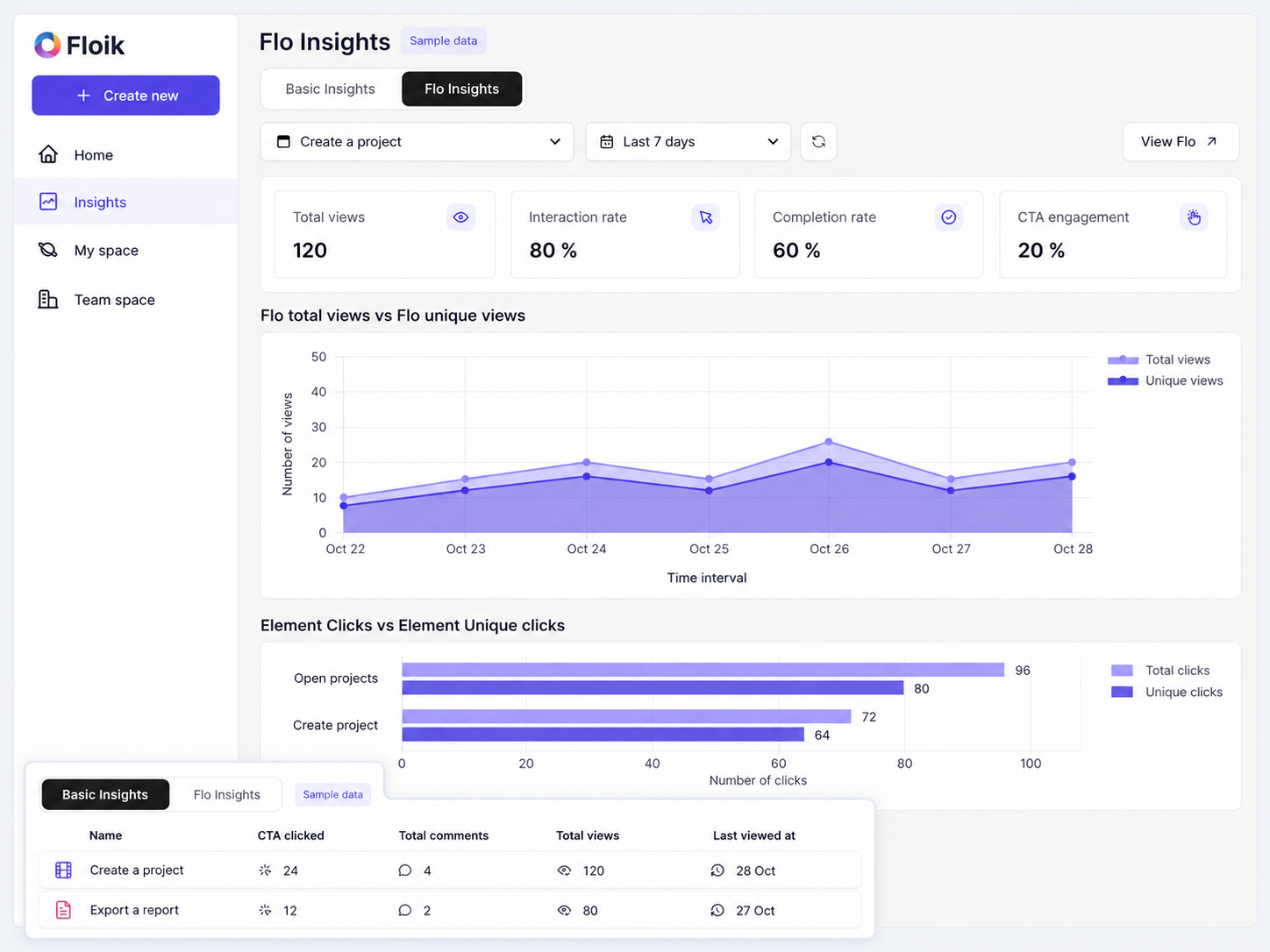
See who viewed your Flo, when they viewed it, and what they did, from a table of all your Flos to step-by-step click data.
Insights - Basic & advanced
Insights

Know what viewers actually do

Publishing a Flo tells you nothing about whether anyone watched it. Insights shows views, clicks, and drop-off for every published Flo.

Every Flo in one table

The Basic Insights tab lists all your published Flos with total views, total clicks, and comments.

Click data for every step

Advanced Insights shows total and unique clicks for each step, plus the engagement patterns behind them.

Find where viewers drop off

See drop-off points and completion rates, then filter by Today or Last 7 Days to spot recent trends.

How can you do this in Floik

Quick looks of how to do this in Floik app

When teams use this

A few situations where this feature saves the most time.

Sales Enablement

Check which demos prospects open and where they stop watching, so reps know what to follow up on.

Recording directly from production

See which steps in your onboarding Flos get clicked and which lose people, then refine the weak ones.

FAQ Unpacked

Frequently asked questions

What are the languages available to add an AI voiceover with Floik?

Can I download guides as PDFs?

Can I unpublish a demo center?

Capture your workflow once.

AI does the heavy lifting. You stay in control.

Capture workflows from your browser or desktop applications with the Floik Chrome extension, or simply upload an MP4. Floik AI does the heavy lifting, taking you all the way to polished interactive guides, SOPs, feature walkthroughs, and professionally narrated videos.

You review. You validate. You refine. You stay in control.

Free plan available · No credit card required


